Sunday, July 8, 2012

How to Clean Up Files for a Faster Mac

This week's photo tip is for all my Mac peeps out there... woot woot! Yes, I'm a mac girl.  It's true... I used to say I would never ever EVER get a Mac (much to B's dismay.)  Then one day my brand new PC with Windows Vista (aka the devil) kept crashing Photoshop.  I simply could. not. work.  Desperate, I bought a Macbook Pro.  I've been in love ever since.


Now here's the thing - my Macs are awesome, but sometimes they get stupid slow.  Like I'd rather stick a fork in my eye slow. It's the curse of being a photographer's computer: bogged down with insane amounts of high resolution images and HD video files.  I would break down and finally delete my unwanted files but it still didn't help.  Eventually I figured out that with Macs, just because you empty your trash bin doesn't mean it's gone for good.  In fact, you need to secure empty trash to actually erase those files so they don't take up space.  Or you need to erase the free space on your Mac.

Confused yet?  No worries! Here's a quick video tip for giving your Mac more pep in it's step :)

Friday, July 6, 2012

Light Painting

Here are some fun photos taken at our family reunion this summer. The first night we walked down towards the swimming hole where it was nice and dark. Then we set up and went crazy with lights. Eventually we discovered that using the bulb setting and the remote made our light painting attempts so much easier.

The next night I wanted to get a long exposure of my family enjoying karaoke. One of my cousins was quite entertained helping out and watching me look like a crazy person dancing in the dark for no apparent reason. We used a flashlight for the white light and my iGlowstick app for the colors. We had so much fun and loved the results.

p.s my ever faithful Ava pup was there there whole time. Chocolate labs rule.


camera: 5D Mark II
lens: 24-70 2.8 L
settings: f/6.3, 30 seconds, 24mm, 100 iso

(YES 30 seconds. We were running out butts off to do this in one shot!)


camera: 5D Mark II
lens: 24-70 2.8 L
settings: f/10, 1 min, 24mm, 100 iso


camera: 5D Mark II
lens: 24-70 2.8 L
settings: f/10, 63 seconds, 24mm, 100 iso

This picture actually said "davib" so I flipped the b to d in Photoshop. The "s" was backwards too. Easy fix in editing.


camera: 5D Mark II
lens: 24-70 2.8 L
settings: f/11, 2 min, 24mm, 100 iso


Light painting is so much fun. You'll need a tripod, remote and some lights to dance around with.  Make a night of it and see what you create!

Wednesday, June 13, 2012

Silhouette Photography - Quick Editing Tip

Here's a quick tip for editing gorgeous silhouettes. I love actions and use them often - my favorites being a mix of Totally Rad Actions and Kubota Actions. Just FYI it's super easy to get caught up in action fever and end up with photos that look too over processed. The trick is to make subtle adjustments to enhance an image - unless you want the picture to have that super saturated / comic effect. And if that's what you're going for, totally cool.

Here's the before picture, straight out of camera, without editing. As you can see this is not exactly a silhouette even though that was my intention with this shot. Yes, I try to get things right in camera as much as possible but sometimes it just happens - no big deal. The exposure is fairly close to what I want and that's an easy fix.


camera: 5D Mark II
lens: 24-70 2.8 L
settings: f/7.1, 1/200, 24mm, 800 iso


And here is the edited silhouette!!

actions used -
Totally Rad Actions (from Daily Grind set)  - "lights out"  used twice
Kubota Artistic Actions (Vol. 2 set)  - "Hawaiian punch"  used once
+ actions adjusted to taste using layer masks

Friday, May 18, 2012

Glitter and Glass - Seeing Things Creatively

One day we hit up a local museum to take some pictures and play around. Here are a few of my favorite shots - I'm digging the glitter and glass.


Next time you're out taking pictures, what will you see?

Sunday, April 1, 2012

Spring Cleaning - 8 Tips for Photography

Well, it's April and I'm all about getting the yard ready for outdoor time, spring cleaning and getting my photo gear in order too. Are you excited about the spring and summer season coming up? There will be lots of picture taking opportunities so get your cameras ready for spring with these 8 tips:


1. Get inspired
Make a list of things you'd love to photograph this season. Plan dates for photo excursions such as shooting tulips at the Arboretum or a photo day at the zoo. Try to get out there and shoot something for fun at least once a week (even if you only have 30 min. to spare.)

2.  Review your goals and skills
What skills have you learned? What can you do to improve those skills? What new skills would you like to learn? Pick two or three goals and create a game plan. You might want to sign up for a class, buy a new book or new gear... make a list and make it happen!

3.  Get squeaky clean
Call your local camera store or send the camera off to the service center (like Canon or Nikon) to have your camera professionally cleaned. There are kits to do sensor cleaning yourself if you have a steady hand (and a quiet, clean place to do it.) Personally I prefer to have it cleaned so I don't have to stress about messing up the sensor.


4.  Backup your pictures
This is so important! Make sure you have backups of your pictures.  I always have at least 3 backups. Don't forget the images on your phone too. There's nothing worse than losing beloved memories. Use external hard drives, additional computers, data DVDs, etc. Just backup those photos. If you have severe thunderstorms, make sure a copy of photos is not plugged in.  We've had lightning take out all electronics before, which is why we shut down and unplug during bad storms - even with our surge protectors.

5.  Clean up your computer
Delete pictures you no longer want, such as photos that didn't make "the cut" etc.  Clean up old folders, organize your pictures to make them easier to find (I organize by year/month/event)  If you have a PC you'll want to defrag your computer too. Mac users can zero out (erase) free space. Doing so will help your computers have more kick!


6. Clean your camera bags
My camera bags get stupid dirty. I've found twigs, leaves and dirt in mine (hey, I crawl around on the ground a lot.)  Bags not in use are also great places for me to dump random gear. Take a moment to clean out those bags, organize them and even give the insides a little vacuum to pick up any dirt, pet hair, etc. that might get in the bag. When photo inspiration hits, your bag will be good to go!

7.  Sell unused gear
I must admit, I'm really bad about this.  I still have my kit lens that I've never used. That being said, one of my goals this spring is to clear out some unused gear. Just like digging through your clothes closet,  take the time to go through and consider selling gear you don't really like or never use. Then take that extra cash and get something else you really want!

8.  Update inventory.
When I shot weddings, I used to keep a list of all of our photo equipment, for insurance purposes.  If you don't have an inventory list yet, consider starting one. If you do have one, make sure it is up-to-date. Make a list with the make, model and serial number of each piece of equipment then keep it in a safe place (make a few copies too!)  The list also includes important phone #'s. You'll be glad to have it in the rare event you might need it.

Monday, February 20, 2012

Shooting Details in Low Light With Basic Lamps and A Tripod

When taking pictures, I'm all about natural light. And for detail shots that nice big window light is the bee's knees. That's my ideal light, but sometimes I run out of time and find myself in the dreaded lamps only low-light situation. Bleh! Yes, I have multiple flashes and could go for an extensive setup but most of the time I'm just lazy. Why would I want to do that? So let's say you're like me and you spent the afternoon playing Sims (um, I mean working) or maybe you just get home after dark. If you're itching to take pictures of your new Etsy swag with only low-light, here's what you do:

Get a tripod.


Tripods come in all sizes and price points - just make sure to get one that is sturdy enough to hold your camera. Those big guns like my Canon 5D Mark II get really heavy. Using a tripod for product shots works wonders in both natural light and low-light detail situations, especially if you want to get lots of stuff in nice focus. But for this post, we're all about that low light situation, inside with just your average household lamps. This is for detail product photography only - not people.

Shooting portraits in this light would just be a hot mess. Trust me.


So here's my lazy person set up:

  • stuff to photograph (globes)

  • camera on tripod

  • two basic floor lamps (different lamps will produce different results, so just try it out)

  • white balance set to Tungsten light (I usually stick with AWB but not in this situation)
Just FYI this is at night, so I'm relying solely on ambient light from lights in the room. In the image above you can see some yucky shadows on the wall.  That's because in this shot the overhead light is on (ceiling fan.) When you're trying to do this, overhead lights like ceiling fans and chandeliers will NOT cut it. They cast too many shadows either on the wall or big shadows from your product.


So let's say you don't have a tripod. This is what happens when you have to use a slow shutter speed to let in more light. Anything handheld slower than 1/50th second is going to look bad.


The other option you have (if you don't have a tripod) is to use flash. Here's an example of the Canon 40D's standard pop up flash. See those big shadows and bright highlights on the globes? Meh.


Low light + details + camera + tripod = yay! In the photo above I only have one light on in the room - lamp #1 (on the right.)  It works nicely, but if you want to fill in a little more shadows / darkness  on the left of the globes... you could turn on lamp #2.


And here it is, a globe shot with both floor lamps turned on. These images have a little editing in Photoshop. There is so much more to work with when you shoot detail shots with a tripod. So the next time you want to take detail shots but it's already dark outside - get out your tripod. And remember, that tripod is great for anytime you're shooting product / detail photography - even when there's still window light to use.

Monday, February 6, 2012

Shooting Macro Photography - Take a Closer Look

One of the best things about digital photography is the ability to take as many pictures as you want to experiment and be creative. Shooting macro photography is just one awesome way to get really creative and it's so much fun.

When I used to shoot weddings, I used my macro lens to shoot ring shots and it's was always one of my favorite things to shoot. Lately I've been looking around the house to see what other stuff I can take pictures of. Once you start thinking on the macro scale of things, all kinds of photo opportunities appear! Note to self: take macro lens and find blue dumpster.

Don't have a macro lens? Some lenses have a "macro" setting and even though it won't get you super close like an actual macro lens, you can still try your hand at shooting in macro.  Just try shooting as close as possible and focus on the little details.  If you have a macro lens, even better!

You could take a picture of a vintage camera:


Or you could get real close:


You could photograph this pretty pretty globe:


Or you could get even closer and focus on where you live:


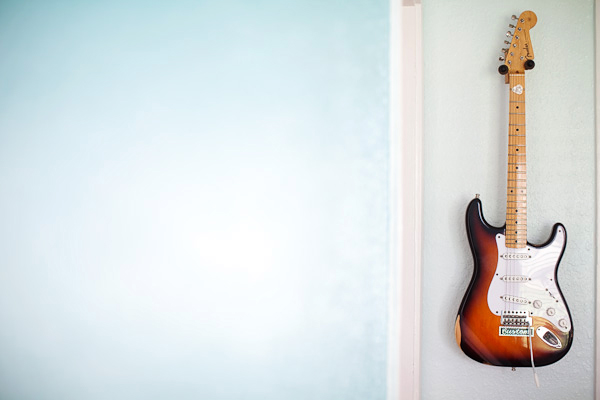
You could take a picture of a guitar... (guitars are cool, just sayin')


Or you could capture some up-close details (my rockstar husband approves.)


Next time you're out, take a closer look at the details around you... what kind of things would you shoot in macro?